Supercharge Your WordPress Website With Premium Elementor Pro Template Kit, Themes & Plugins


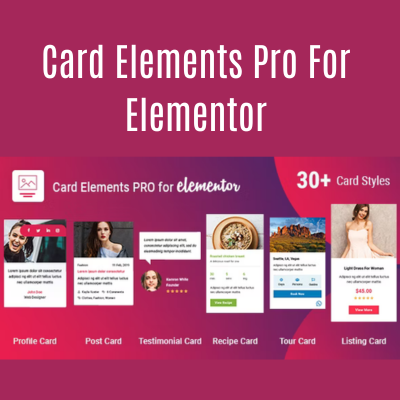
Card Elements Pro for Elementor
Original price was: $7.75.$0.95Current price is: $0.95.
Description
Description
Overview of Card Elements Pro for Elementor
Card Elements Pro for Elementor is a powerful plugin that enhances the capabilities of the Elementor page builder by adding versatile and customizable card elements. This plugin allows users to create visually appealing card layouts for showcasing content, such as blog posts, products, team members, testimonials, and more. The cards can include images, text, icons, buttons, and other interactive elements to make the content more engaging.
Key Features:
- Pre-designed Card Layouts: The plugin comes with a variety of pre-designed card layouts that can be easily customized to fit the website’s style and branding.
- Advanced Customization Options: Users have complete control over the design of the cards, including typography, colors, spacing, borders, and shadows. There are also options to customize hover effects and animations.
- Dynamic Content Integration: Card Elements Pro allows for the integration of dynamic content from various sources, such as WordPress posts, WooCommerce products, and custom post types. This feature enables automatic updates of card content based on new or modified data.
- Interactive Elements: Users can add interactive elements like buttons, icons, and links to the cards, enhancing user engagement and navigation.
- Responsive Design: The card elements are fully responsive, ensuring that they look great on all devices, including desktops, tablets, and smartphones.
- Performance Optimized: The plugin is optimized for performance, ensuring that it does not slow down the website, even with multiple cards and complex layouts.
Functionality of Card Elements Pro for Elementor
To use the Card Elements Pro plugin, follow these steps:
- Installation and Activation:
- Install the Card Elements Pro plugin via the WordPress dashboard.
- Activate the plugin and ensure that Elementor is also activated.
- Adding a Card Element:
- In the Elementor editor, search for “Card” in the widget panel.
- Drag and drop the “Card” element onto the desired section of your page.
- Customizing the Card:
- Content Tab: Add images, titles, descriptions, and buttons. You can also integrate dynamic content using the available options.
- Style Tab: Customize the appearance of the card, including typography, colors, background, borders, and shadows. Adjust the spacing and alignment as needed.
- Advanced Tab: Fine-tune the card’s settings, including margins, padding, responsive controls, motion effects, and custom CSS.
- Using Dynamic Content:
- If using dynamic content, select the source (e.g., posts, products) and set the query parameters to filter the desired content.
- The card will automatically populate with content from the chosen source and update dynamically as content changes.
- Adding Interactivity:
- Add interactive elements such as buttons, icons, or links.
- Customize hover effects to enhance user interaction, such as changing colors or displaying additional information when a user hovers over the card.
- Saving and Publishing:
- After customizing the card to your satisfaction, click “Publish” or “Update” to save your changes and make the card live on your website.
Card Elements Pro for Elementor is a versatile tool that empowers users to create visually appealing and functional card layouts, enhancing the overall design and user experience of their website.
Reviews (0)
Related products
-
All in One Wp Migration Unlimited Extension
Original price was: $5.00.$0.75Current price is: $0.75.



-

-

-

-

-
 Yoast Seo Premium Wordpress Plugin0 ReviewsOriginal price was: $7.95.$1.05Current price is: $1.05.
Reviews
There are no reviews yet.